Advanced Machine Learning with Python (Session 2 - Part 1)

Fernando Cervantes (fernando.cervantes@jax.org)

Workshop outcomes

  • Understand the process of training ML models.
  • Load pre-trained ML models and fine-tune them with new data.
  • Evaluate the performance of ML models.
  • Adapt ML models for different tasks from pre-trained models.

Materials

Open notebook in Colab View solutions

0. Setup environment

Select runtime and connect

On the top right corner of the page, click the drop-down arrow to the right of the Connect button and select Change runtime type.

Make sure Python 3 runtime is selected. For this part of the workshop CPU acceleration is enough.

Now we can connect to the runtime by clicking Connect. This will create a Virtual Machine (VM) with compute resources we can use for a limited amount of time.

Caution

In free Colab accounts these resources are not guaranteed and can be taken away without notice (preemptible machines).

Data stored in this runtime will be lost if not moved into other storage when the runtime is deleted.

Load pre-trained models

Load pre-trained models

  • Lets use one from the PyTorch’s torchvision module for computer vision

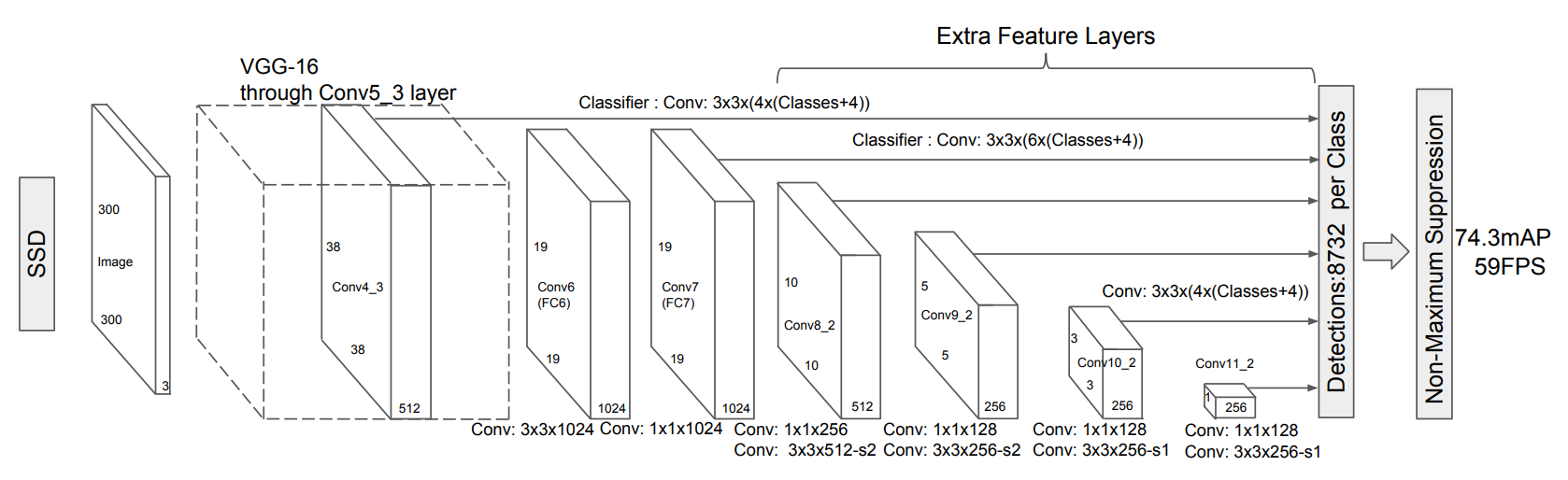
  • Now, try the Single Shot MultiBox Detector (SSD) model. SSD

Exercise: Use a pre-trained deep learning model to detect objects in images

import torch
from torchvision import models

ssd_weights = models.detection.SSD300_VGG16_Weights.DEFAULT

ssd_weights.meta
{'num_params': 35641826,
 'categories': ['__background__',
  'person',
  'bicycle',
  'car',
  'motorcycle',
  'airplane',
  'bus',
  'train',
  'truck',
  'boat',
  'traffic light',
  'fire hydrant',
  'N/A',
  'stop sign',
  'parking meter',
  'bench',
  'bird',
  'cat',
  'dog',
  'horse',
  'sheep',
  'cow',
  'elephant',
  'bear',
  'zebra',
  'giraffe',
  'N/A',
  'backpack',
  'umbrella',
  'N/A',
  'N/A',
  'handbag',
  'tie',
  'suitcase',
  'frisbee',
  'skis',
  'snowboard',
  'sports ball',
  'kite',
  'baseball bat',
  'baseball glove',
  'skateboard',
  'surfboard',
  'tennis racket',
  'bottle',
  'N/A',
  'wine glass',
  'cup',
  'fork',
  'knife',
  'spoon',
  'bowl',
  'banana',
  'apple',
  'sandwich',
  'orange',
  'broccoli',
  'carrot',
  'hot dog',
  'pizza',
  'donut',
  'cake',
  'chair',
  'couch',
  'potted plant',
  'bed',
  'N/A',
  'dining table',
  'N/A',
  'N/A',
  'toilet',
  'N/A',
  'tv',
  'laptop',
  'mouse',
  'remote',
  'keyboard',
  'cell phone',
  'microwave',
  'oven',
  'toaster',
  'sink',
  'refrigerator',
  'N/A',
  'book',
  'clock',
  'vase',
  'scissors',
  'teddy bear',
  'hair drier',
  'toothbrush'],
 'min_size': (1, 1),
 'recipe': 'https://github.com/pytorch/vision/tree/main/references/detection#ssd300-vgg16',
 '_metrics': {'COCO-val2017': {'box_map': 25.1}},
 '_ops': 34.858,
 '_file_size': 135.988,
 '_docs': 'These weights were produced by following a similar training recipe as on the paper.'}
categories = ssd_weights.meta["categories"]

Tip

More info about SSD implementation in torchvision here.

Exercise: Use a pre-trained deep learning model to detect objects in images

dl_model = models.detection.ssd300_vgg16(ssd_weights, progress=True)

dl_model.eval()
SSD(
  (backbone): SSDFeatureExtractorVGG(
    (features): Sequential(
      (0): Conv2d(3, 64, kernel_size=(3, 3), stride=(1, 1), padding=(1, 1))
      (1): ReLU(inplace=True)
      (2): Conv2d(64, 64, kernel_size=(3, 3), stride=(1, 1), padding=(1, 1))
      (3): ReLU(inplace=True)
      (4): MaxPool2d(kernel_size=2, stride=2, padding=0, dilation=1, ceil_mode=False)
      (5): Conv2d(64, 128, kernel_size=(3, 3), stride=(1, 1), padding=(1, 1))
      (6): ReLU(inplace=True)
      (7): Conv2d(128, 128, kernel_size=(3, 3), stride=(1, 1), padding=(1, 1))
      (8): ReLU(inplace=True)
      (9): MaxPool2d(kernel_size=2, stride=2, padding=0, dilation=1, ceil_mode=False)
      (10): Conv2d(128, 256, kernel_size=(3, 3), stride=(1, 1), padding=(1, 1))
      (11): ReLU(inplace=True)
      (12): Conv2d(256, 256, kernel_size=(3, 3), stride=(1, 1), padding=(1, 1))
      (13): ReLU(inplace=True)
      (14): Conv2d(256, 256, kernel_size=(3, 3), stride=(1, 1), padding=(1, 1))
      (15): ReLU(inplace=True)
      (16): MaxPool2d(kernel_size=2, stride=2, padding=0, dilation=1, ceil_mode=True)
      (17): Conv2d(256, 512, kernel_size=(3, 3), stride=(1, 1), padding=(1, 1))
      (18): ReLU(inplace=True)
      (19): Conv2d(512, 512, kernel_size=(3, 3), stride=(1, 1), padding=(1, 1))
      (20): ReLU(inplace=True)
      (21): Conv2d(512, 512, kernel_size=(3, 3), stride=(1, 1), padding=(1, 1))
      (22): ReLU(inplace=True)
    )
    (extra): ModuleList(
      (0): Sequential(
        (0): MaxPool2d(kernel_size=2, stride=2, padding=0, dilation=1, ceil_mode=False)
        (1): Conv2d(512, 512, kernel_size=(3, 3), stride=(1, 1), padding=(1, 1))
        (2): ReLU(inplace=True)
        (3): Conv2d(512, 512, kernel_size=(3, 3), stride=(1, 1), padding=(1, 1))
        (4): ReLU(inplace=True)
        (5): Conv2d(512, 512, kernel_size=(3, 3), stride=(1, 1), padding=(1, 1))
        (6): ReLU(inplace=True)
        (7): Sequential(
          (0): MaxPool2d(kernel_size=3, stride=1, padding=1, dilation=1, ceil_mode=False)
          (1): Conv2d(512, 1024, kernel_size=(3, 3), stride=(1, 1), padding=(6, 6), dilation=(6, 6))
          (2): ReLU(inplace=True)
          (3): Conv2d(1024, 1024, kernel_size=(1, 1), stride=(1, 1))
          (4): ReLU(inplace=True)
        )
      )
      (1): Sequential(
        (0): Conv2d(1024, 256, kernel_size=(1, 1), stride=(1, 1))
        (1): ReLU(inplace=True)
        (2): Conv2d(256, 512, kernel_size=(3, 3), stride=(2, 2), padding=(1, 1))
        (3): ReLU(inplace=True)
      )
      (2): Sequential(
        (0): Conv2d(512, 128, kernel_size=(1, 1), stride=(1, 1))
        (1): ReLU(inplace=True)
        (2): Conv2d(128, 256, kernel_size=(3, 3), stride=(2, 2), padding=(1, 1))
        (3): ReLU(inplace=True)
      )
      (3-4): 2 x Sequential(
        (0): Conv2d(256, 128, kernel_size=(1, 1), stride=(1, 1))
        (1): ReLU(inplace=True)
        (2): Conv2d(128, 256, kernel_size=(3, 3), stride=(1, 1))
        (3): ReLU(inplace=True)
      )
    )
  )
  (anchor_generator): DefaultBoxGenerator(aspect_ratios=[[2], [2, 3], [2, 3], [2, 3], [2], [2]], clip=True, scales=[0.07, 0.15, 0.33, 0.51, 0.69, 0.87, 1.05], steps=[8, 16, 32, 64, 100, 300])
  (head): SSDHead(
    (classification_head): SSDClassificationHead(
      (module_list): ModuleList(
        (0): Conv2d(512, 364, kernel_size=(3, 3), stride=(1, 1), padding=(1, 1))
        (1): Conv2d(1024, 546, kernel_size=(3, 3), stride=(1, 1), padding=(1, 1))
        (2): Conv2d(512, 546, kernel_size=(3, 3), stride=(1, 1), padding=(1, 1))
        (3): Conv2d(256, 546, kernel_size=(3, 3), stride=(1, 1), padding=(1, 1))
        (4-5): 2 x Conv2d(256, 364, kernel_size=(3, 3), stride=(1, 1), padding=(1, 1))
      )
    )
    (regression_head): SSDRegressionHead(
      (module_list): ModuleList(
        (0): Conv2d(512, 16, kernel_size=(3, 3), stride=(1, 1), padding=(1, 1))
        (1): Conv2d(1024, 24, kernel_size=(3, 3), stride=(1, 1), padding=(1, 1))
        (2): Conv2d(512, 24, kernel_size=(3, 3), stride=(1, 1), padding=(1, 1))
        (3): Conv2d(256, 24, kernel_size=(3, 3), stride=(1, 1), padding=(1, 1))
        (4-5): 2 x Conv2d(256, 16, kernel_size=(3, 3), stride=(1, 1), padding=(1, 1))
      )
    )
  )
  (transform): GeneralizedRCNNTransform(
      Normalize(mean=[0.48235, 0.45882, 0.40784], std=[0.00392156862745098, 0.00392156862745098, 0.00392156862745098])
      Resize(min_size=(300,), max_size=300, mode='bilinear')
  )
)


Exercise: Use a pre-trained deep learning model to detect objects in images

import numpy as np
import skimage
import matplotlib.pyplot as plt

sample_im = skimage.data.cat()

sample_im.shape
(300, 451, 3)

Exercise: Use a pre-trained deep learning model to detect objects in images

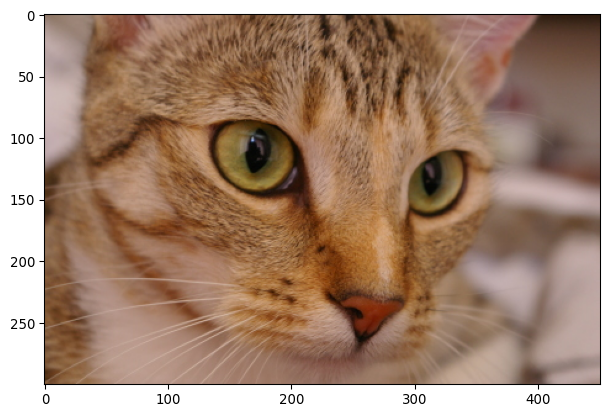
plt.imshow(sample_im)
plt.show()

Exercise: Use a pre-trained deep learning model to detect objects in images

ssd_weights.transforms
torchvision.transforms._presets.ObjectDetection

Important

functools.partial is a function to define functions with static arguments. So 👆 returns a function when it is called!

Note

The transforms used by the SSD are

  1. convert the array into a torch.Tensor,

  2. rescale the RGB channels to a \([0, 1]\) range.

Exercise: Use a pre-trained deep learning model to detect objects in images

from torchvision.transforms.v2 import Compose, ToTensor

pipeline = Compose([
  ToTensor(),
  ssd_weights.transforms()
])

pipeline
Compose(
      ToTensor()
      ObjectDetection()
)

Exercise: Use a pre-trained deep learning model to detect objects in images

sample_x = pipeline(sample_im)
type(sample_x), sample_x.shape, sample_x.min(), sample_x.max()
(torch.Tensor, torch.Size([3, 300, 451]), tensor(0.), tensor(0.9059))

Exercise: Use a pre-trained deep learning model to detect objects in images

Caution

Apply the model on sample_x[None, …], so it is treated as a one-sample batch

with torch.no_grad():
  sample_y = dl_model(sample_x[None, ...])

sample_y[0].keys()
dict_keys(['boxes', 'scores', 'labels'])

Exercise: Use a pre-trained deep learning model to detect objects in images

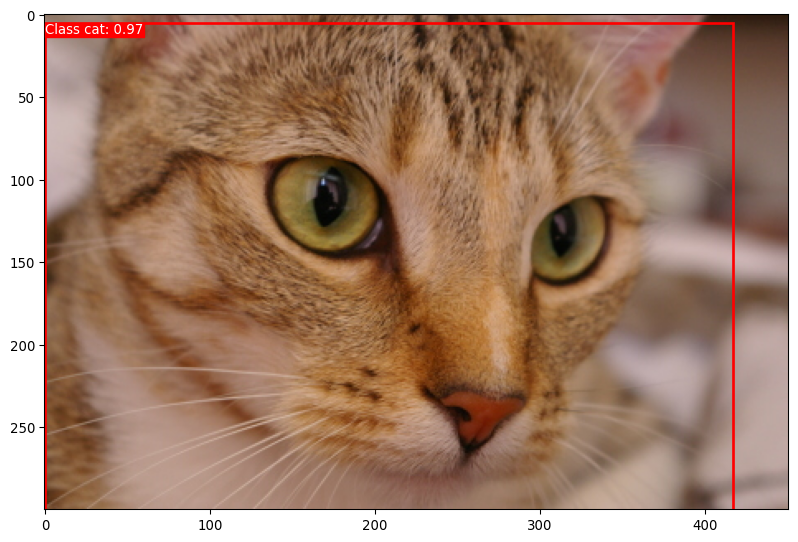
import matplotlib.patches as patches

threshold = 0.10
filtered_detections = np.argwhere(sample_y[0]["scores"] > threshold)[0]

fig, ax = plt.subplots(1, figsize=(10, 10))
ax.imshow(sample_im)

for idx in filtered_detections:
    class_id = sample_y[0]["labels"][idx]
    score = sample_y[0]["scores"][idx]

    tl_x, tl_y, width, height = sample_y[0]["boxes"][idx]

    rect = patches.Rectangle(
        (tl_x, tl_y), width, height,
        linewidth=2, edgecolor='r', facecolor='none'
    )

    ax.add_patch(rect)
    ax.text(tl_x, tl_y, f'Class {categories[class_id]}: {score:.2f}', 
            color='white', verticalalignment='top', 
            bbox={'color': 'red', 'pad': 0}
    )

Exercise: Use a pre-trained deep learning model to detect objects in images

def detect_objects(sample_im, threshold=0.5):
    sample_x = pipeline(sample_im)

    with torch.no_grad():
        sample_y = dl_model(sample_x[None, ...])


    filtered_detections = np.argwhere(sample_y[0]["scores"] > threshold)[0]

    fig, ax = plt.subplots(1, figsize=(10, 10))
    ax.imshow(sample_im)

    for idx in filtered_detections:
        class_id = sample_y[0]["labels"][idx]
        score = sample_y[0]["scores"][idx]

        tl_x, tl_y, width, height = sample_y[0]["boxes"][idx]

        rect = patches.Rectangle(
            (tl_x, tl_y), width, height,
            linewidth=2, edgecolor='r', facecolor='none'
        )

        ax.add_patch(rect)
        ax.text(tl_x, tl_y, f'Class {categories[class_id]}: {score:.2f}', 
                color='white', verticalalignment='top', 
                bbox={'color': 'red', 'pad': 0}
        )

    plt.show()
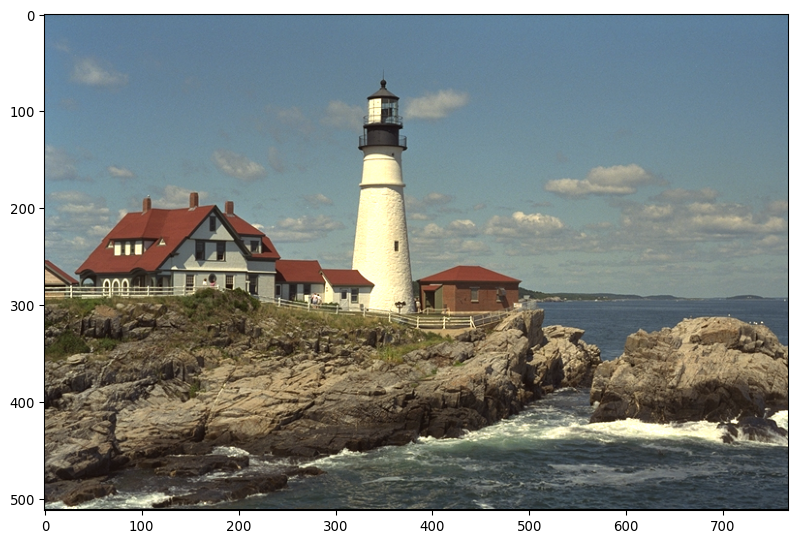
sample_im = skimage.io.imread("https://r0k.us/graphics/kodak/kodak/kodim21.png")

detect_objects(sample_im, threshold=0.5)